Showing posts with label Louanne Adams. Show all posts
Showing posts with label Louanne Adams. Show all posts
Friday, 10 February 2017



Monday, 23 January 2017
Friday, 20 January 2017

Editing 2


- Effects
- Title credits
- Ident
- Distribution company
- Colour Correction, Lightening
- Soundscape
- Match cuts


According to the codes and conventions of a title sequence the distribution company should come next after the Production Ident which is what we did next

This consisted of the same concept of making a production ident so wasn't difficult at all. After doing these a number of time it become no struggle at all.
3. Sound- Creating a Soundscape for our title sequence went well for us. We used a mixture of digetic and non diegetic sounds to create the most realistic out come possible. As well as including the original back ground sound from filming we had our instrumental music and a low drone sound effect both run through the entire title sequence. At times we increased the volume to heighten certain emotions from the audience and build suspense and vice versa, decreasing the volume as well. The low drone complimented the title sequence. We used the fade effect to have a nice slow build up of the music and a fade out to create a nice effect. We had sound effects at certain places to compliment the title sequence such as the iPhone text message sounds when a message poped up on the screen, a low steady heartbeat at certain scenes, and much more. Personally, i found sound too be the easiest aspect in editing.
5. Colour Correction- Some of our scenes we filmed when it was dark to get more spinster and mysterious effect which was great but was too dark that you couldn't see the actors facial expression when she gets grabbed from behind. This was an important factor as you can see the shock and fear in the characters face which we wanted to get across to the audience, so to be able to see her facial expression was key. Thus, we had to make them scenes lighter increasing its lightening and contrast. This complimented the film and made a huge difference. In order to make all the scenes flow we had to colour correct lighter scenes and darker scenes so that they look more realistic as if it all happened in the same day.
Sunday, 15 January 2017
Editing 1

Titles and title credits are featured in every
title sequence and is a very important element. The title of a film often
relates to it as a whole and sets a tone. It does this by the name of the title
itself e:g 'Doppelganger' , immediately giving the audience an idea of
what the film is going to be about, due to the fact that specific titles are
used with clear connotations. Credits are also very important in films, as the
give recognition to the actors as well as the people who were involved in the
production of this film.
HOW DID WE CREATE TITLES AND TITLE
CREDITS?

Our title sequence
was constructed on the software Premier Pro, however our title credits were
produced in After Effects. We began by opening our title sequence through
Premier Pro and then clicking 'file' 'Adobe Dynamic Link' and then 'New After
Effects Composition.' This is a more efficient way of creating credits for our
title sequence, as this way we did not have to continuously import titles from
after effects to premier pro. This in turn saved a lot of time. By creating
title credits this way, whatever we produced in After effects would
automatically import itself to our Premier Pro file - changes and all.

After clicking 'New After Effects Composition'
a blank page would appear in After Effects. After typing a simple
'Doppelganger' the title of our title sequence, we went onto the website
Dafont, to find the perfect font for our film. Font play an important part in a
title sequence, as it often sets a tone, telling the audience a lot about a
film. We chose the font 'Lugosi' a font that had connotations of crime,
violence and something immoral. To make this font appear as an option in After
Effects, we simply downloaded it onto the desktop.

 After applying the
font Lugosi to our title, we decided to add an effect to give it more of a
personality. We did this by clicking 'Effects and Presets' to the right of the
blank page. This gives us options to various effects to add to our title. At first
we were very adamant on using an effect called Jiggy, which caused the title to
shake vigorously. We got this idea from the title sequence 'Se7en', a title
sequence that we were majorly influenced and inspired by, that is also a
thriller and has a stalking element. However, after some consideration, we
decided that this effect is to heavy and perhaps over the top for our title
sequence. The connotations were too harsh, giving off horror vibes rather than
thriller. Our film did not involve any gruesome, grotesque scenes and upon
realising this we decided to use a more toned down effect. We ended up
choosing, a fade in effect, where each letter of our title appeared slowly.
This related to the fact, that Alessandra (evil twin) slowly entered Millicent's
(good twin) life, unknowingly.
After applying the
font Lugosi to our title, we decided to add an effect to give it more of a
personality. We did this by clicking 'Effects and Presets' to the right of the
blank page. This gives us options to various effects to add to our title. At first
we were very adamant on using an effect called Jiggy, which caused the title to
shake vigorously. We got this idea from the title sequence 'Se7en', a title
sequence that we were majorly influenced and inspired by, that is also a
thriller and has a stalking element. However, after some consideration, we
decided that this effect is to heavy and perhaps over the top for our title
sequence. The connotations were too harsh, giving off horror vibes rather than
thriller. Our film did not involve any gruesome, grotesque scenes and upon
realising this we decided to use a more toned down effect. We ended up
choosing, a fade in effect, where each letter of our title appeared slowly.
This related to the fact, that Alessandra (evil twin) slowly entered Millicent's
(good twin) life, unknowingly.
To add the effect,
all we did was simply drag it onto the title itself and clicked the space bar
to watch it. After we were content with it, we merely clicked off After
Effects, onto Premier Pro, where our newly made title sequence was already
waiting. After watching it once more, we dragged the short clip onto our other
title sequence clips. Because this was our main title we did not drag it onto
our other title sequence clips, in order for it to appear on a blank screen.
With the main title on a blank screen, the audience will focus purely on it and
not be distracted by anything else, which emphasises it purpose. However for
our other credits, we dragged it on top on of of clips, in order for them to
merge.
One problem we faced while completing our title and
title credit, is making remembering to save it to our video drive. Each time we
opened a 'New After Effects Composition.' an option to save it to
either our desktop, downloads etc was presented, however due to the process of
making credits being so simple and quick, it was difficult to remember to stop
and click save to video drive. This was a problem, as when we opened our title
sequence on another computer, all our new credits would not appear. This in
turn slowed us down as we had to re create the credits all over again and this
time save them to the video drive.

Website
DOPPELGANGER WEBSITE
http://thedoppelganger2017.weebly.com/


Our group have created a website for our film 'Doppelganger.' We believe that online forms of media such as websites, twitter, facebook etc are great ways to create a loyal fan base and also to further promote. As our generation grows, so does online presences, which is why creating a website for our title sequence is a very efficient idea. On our website it will feature information about our film such as, cinemas local to you that are now displaying Doppelganger etc. Also extras, interviews, behind the scene shots and information about the actors. As well as all of this, there will be merchandise available to purchase also, such as t - shirts, stationary, toys for children and much more.
Thursday, 12 January 2017

Updates- Redo Filming
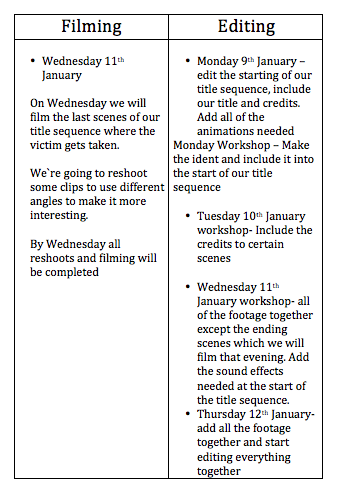
We've finally completed all of our redos and have filmed our entire title sequence. We used a range of new interesting shot types and changed locations to make it more intriguing and appealing.

Sunday, 8 January 2017
Updated Story board
We've created an animated story board with our soundtrack included so we could get a better feel of how its going to become.


Friday, 23 December 2016
Monday, 19 December 2016
Day 3

 |
| Imovie to edit Vlog |

OUR LAST DAY FILMING!
Ironically, even though it was our last day filming we filmed our first few scenes of our title sequence. This consisted of when they're messaging each other at the start of the day and is filmed in her bedroom. We managed to keep to our schedule and our plan which was very well as we didn't run over time and didn't have to rush anything. At the end of the day we was quite proud of the scenes we filmed as we used a variety of shots and camera skills. We didn't face a lot of problems or issues but one we did was keeping the camera still and steady when panning or filming as we didn't have a tripod. If i could go back and make any improvements it would be to use a tripod and film more earlier so it doesn't get too dark. The weather was quite cold but fortunately it didn't rain even though we was indoors majority of the time.

Subscribe to:
Posts (Atom)